

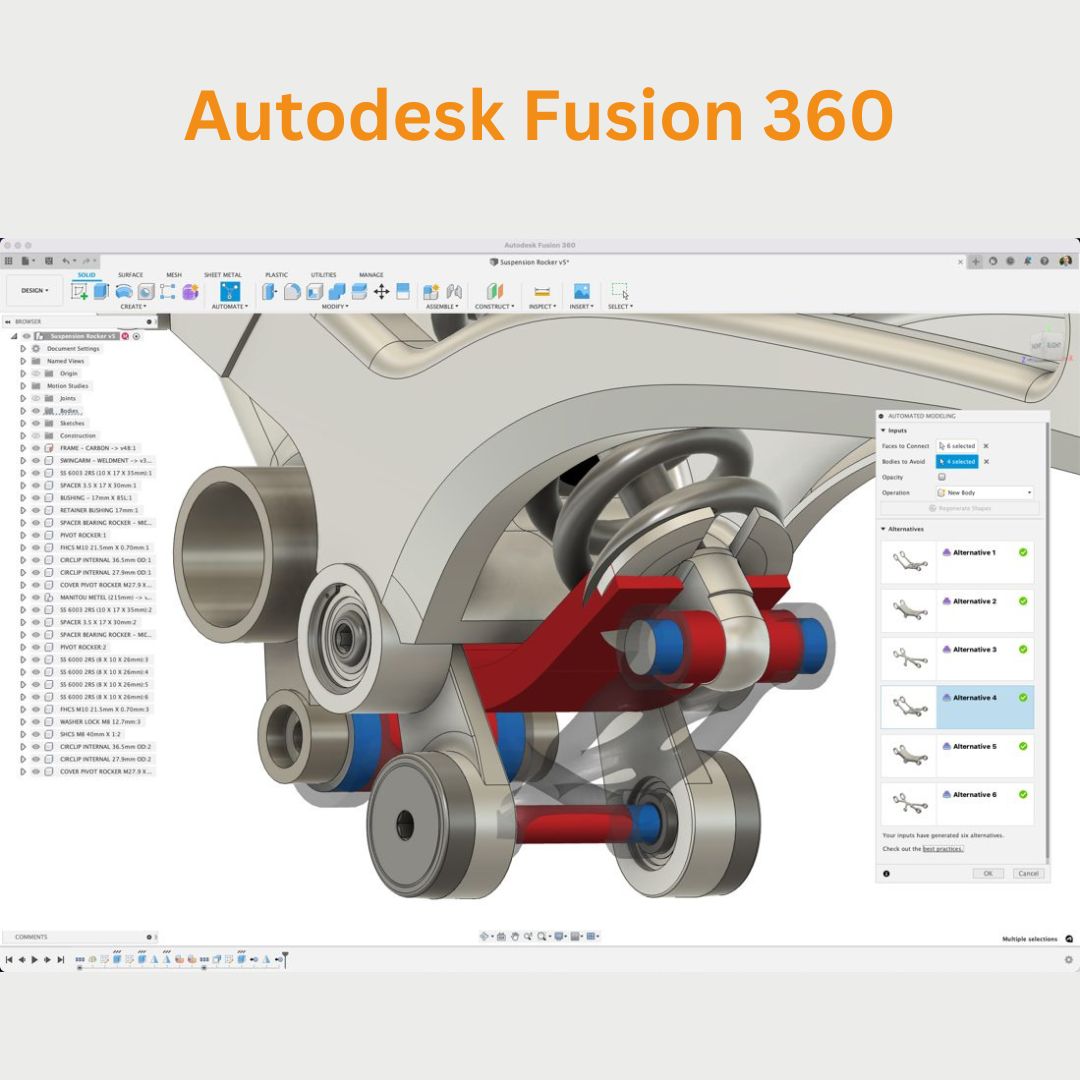

Autodesk Fusion 360 is a cloud-based 3D CAD, CAM, and CAE tool for product design, engineering, and manufacturing. It combines various design disciplines such as parametric, freeform, and direct modeling, along with simulation, collaboration, and machining features, all in one platform.
Key features of Fusion 360 include:
- 3D Modeling: Create parametric, mesh, and direct 3D models.
- CAD & CAM Integration: Perform computer-aided design (CAD) and computer-aided manufacturing (CAM) tasks in one environment, ideal for creating designs and generating tool paths for CNC machining.
- Simulation: Run structural, thermal, and motion simulations to test the performance of your designs.
- Collaboration: Share designs with teams or clients for real-time collaboration, with cloud storage and version control.
- Generative Design: Use AI-driven tools to generate optimized design alternatives based on specific parameters, material constraints, and performance requirements.
- 3D Printing: Prepare and export models for 3D printing directly from Fusion 360.
- Sculpting: Model freeform shapes using T-Splines and other advanced sculpting tools.
- Electrical Design: Design electrical circuits and systems with integrated tools for schematic capture and PCB layout.
- Rendering: Create high-quality visualizations of your models using Fusion 360’s rendering tools.
Fusion 360 is popular among hobbyists, small businesses, and professionals because it offers a complete set of tools for product design and development in one integrated platform. Additionally, its cloud-based nature makes it easy to collaborate remotely.
System Requirements for Autodesk Fusion 360
The system requirements for Autodesk Fusion 360 can vary based on the operating system and the complexity of the tasks you’re performing. Below are the general system requirements for running Fusion 360 effectively:
For Windows (64-bit)
Minimum Requirements:
- Operating System: Windows 10 or later (64-bit)
- Processor: 1.6 GHz or faster processor (64-bit)
- RAM: 4 GB RAM (8 GB or more recommended)
- Graphics Card: DirectX 11-capable graphics card with 1 GB VRAM (2 GB VRAM or more recommended)
- Display: 1280 x 800 screen resolution
- Disk Space: 3 GB of available hard disk space for installation
- Internet: Internet connection required for installation, updates, and collaboration
- Browser: Microsoft Edge, Google Chrome, or Mozilla Firefox for accessing cloud features
Recommended Requirements:
- Operating System: Windows 10 64-bit or later
- Processor: Multi-core processor (Intel Core i7 or AMD Ryzen 7 or better)
- RAM: 8 GB or more
- Graphics Card: DirectX 12-compatible graphics card with 4 GB or more VRAM
- Display: 1920 x 1080 resolution or higher
- Disk Space: 3 GB free space for installation and additional storage for files
- Internet: Broadband internet connection for optimal cloud features and collaboration
- Other: A multi-touch screen (optional, for touch-based interfaces)
For macOS
Minimum Requirements:
- Operating System: macOS 10.14 Mojave or later
- Processor: Intel Core i3 or equivalent (M1 chip or better recommended for newer macOS versions)
- RAM: 4 GB RAM (8 GB or more recommended)
- Graphics Card: Intel HD Graphics 5000 or better, or a dedicated GPU (Metal compatible)
- Display: 1280 x 800 screen resolution
- Disk Space: 3 GB available hard disk space
- Internet: Internet connection required for installation, updates, and collaboration
- Browser: Safari, Google Chrome, or Mozilla Firefox for cloud features
Recommended Requirements:
- Operating System: macOS 10.14 Mojave or later
- Processor: Apple M1 chip or Intel Core i7 processor (or higher)
- RAM: 8 GB or more
- Graphics: Metal-supported graphics (integrated or discrete GPUs with 4 GB VRAM or more)
- Display: 1920 x 1080 resolution or higher
- Disk Space: 3 GB of free space, additional storage recommended for larger files
- Internet: Broadband internet for full functionality, collaboration, and cloud storage
Other Notes:
- Cloud-based Collaboration: Fusion 360 uses cloud computing, so a stable and fast internet connection is essential for optimal performance, particularly when working with large assemblies or collaborating with teams.
- Graphics Card: Fusion 360 relies heavily on the GPU for rendering and simulation tasks, so using a certified workstation graphics card (like NVIDIA Quadro or AMD Radeon Pro) can improve performance for advanced workflows.
- Additional Software: Make sure your operating system and drivers are up to date for the best compatibility.
These are general guidelines, and performance may vary based on your specific projects and hardware configuration. For more detailed system recommendations, Autodesk offers updated information on their Fusion 360 system requirements page.
Reviews
There are no reviews yet.